

The Manage Subtypes: Add Content Subtype for Content Type page allows you to create new Content Subtypes with the following option:
- Name. The name of the Subtype.
The Actions Add'l Actions Menu
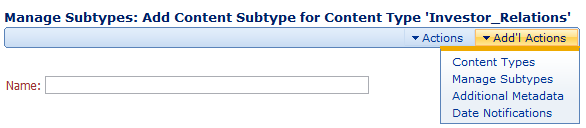
The Actions and Add'l Actions menu has the following options:
- Save. Saves the current Content Type.
- Reset. Restores the original values of the Name and Description fields.
- Content Types. Takes you to the Manage Metadata: Manage Content Types screen where you can view the list of Content Types.
- Manage Subtypes. Takes you to the Manage Content Types: Content Subtype Administration for Content Type screen where you can view the list of Subtypes associated with the current Content Type.
- Additional Metadata. Takes you to the Manage Metadata: Manage Additional Metadata screen where you can view additional metadata associated with the current Content Type and Subtype.
- Date Notifications. Takes you to the Manage Metadata: Manage Date Notifications screen where you can view date notifications associated with the current Content Type and Subtype.
Comments